
FIELD PROCESSING
AI Field Processing for Logistics Orders
Define the data you need. Let AI extract it from every order.
Logichainge Field Processing uses AI to read incoming logistics orders and extract the information your operation needs. Instead of looking for a fixed document layout, the AI is given a predefined set of data fields and identifies the corresponding information within each order.
The extracted data then moves through the configured Logichainge processing flow, where Client Setup data, custom rules and Dictionaries can be used to complete, derive and standardise the information before it is delivered to the next step in LCP or LDQ.
What is field processing?
Field Processing is the AI-based method Logichainge uses to convert incoming logistics orders into structured data. Before processing starts, the organisation defines which data fields are relevant to its workflow. These can include information such as references, loading and delivery addresses, dates, cargo details, quantities, prices or other operational fields.
When an order arrives, the AI reads the available content and extracts the information that corresponds to those predefined fields. The result is structured order data that can be used by the rest of the Logichainge workflow.

How do predefined fields guide the AI?
The AI does not decide independently which information should be extracted. Logichainge first defines the data fields that are relevant to the customer's process. Field Processing then uses those configured fields as the structure for interpreting each incoming order.
This allows different order formats to produce the same structured output. One customer may place a reference at the top of a PDF, another may mention it inside an email, and another may use a completely different document layout. As long as the required information can be identified, Field Processing can map it to the same configured field.
SET UP ONCE
Set it up once and forget about it
Configure your sources, rules and destinations once. From there, the platform continuously validates, enriches, and routes your logistics data so your team can focus on operations.

One-time configuration
Set the flow once
Always-on processing
Runs continuously
Continuous visibility
Track performance in real time
HOW LOGICHAINGE FIELD PROCESSING WORKS
How do predefined fields guide the AI?
The AI does not decide independently which information must be extracted.

01
Define data fields
Choose which data is relevant, mandatory and/or optional

03
Process the order
Logichainge's AI reads the order content, extracts the necessary information and creates a structured output to send to you
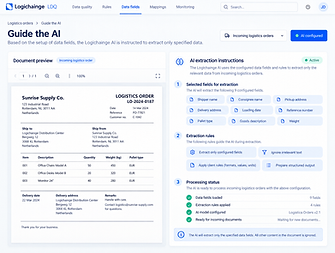
02
Guide the AI
Based on the setup of data fields, the Logichainge AI is instructed to extract only specified data

04
See the output
The structured output from the AI is either sent to the Logichainge order entry platform or Logichainge data quality. In the order entry platform, you can see and edit the output to add to the feedback loop. With Logichainge data quality, the data is already in your system!

05
Repeat!
Thanks to field processing's setup, any file, style or format can be sent to the Logichainge AI. The AI will read the content and extract the exact data your operation requires, without fail.
How does field processing turn extracted data into usable order data?
AI extraction is only the first part of Field Processing. After the required fields have been extracted, Logichainge can use additional configuration to make the resulting data suitable for the customer's operation.
Client setup can apply information that is known about the sender, Custom Rules & Logic can derive values from the available order information, and dictionaries can translate values into the terminology or codes expected by downstream systems. Together, these components allow the same AI extraction process to support different clients and different operational requirements.
Each component has a separate role. Field Processing extracts the source information; the remaining configuration determines how that information should be completed, interpreted and represented for the customer's workflow.

What does AI field processing improve?
Less manual order entry
Extract required logistics information without employees manually copying every value from incoming orders.
Flexible input formats
Process different customer layouts without requiring every sender to use the same document structure.
Consistent structured output
Convert varying order content into the same predefined data fields used by downstream workflows.
Scalable order processing
Process higher order volumes without increasing repetitive data-entry work at the same rate.
Field Processing separates the format in which an order arrives from the format in which your operation needs the data.
Field processing in LCP and LDQ
Field Processing is used by both Logichainge platforms. Order entry module (LCP) and data quality platform (LDQ) use the same AI-based extraction and configuration process up to the point where their workflows diverge. In LCP, the resulting data is presented to a user for validation. In LDQ field processing, the workflow continues automatically without this order-validation screen.
